

Helpdesk
In short
Helpdesk brings every facility request into one place, whichever channel it arrived through: phone, email, WhatsApp, portal, QR code or the helpdesk mailbox. Each request is captured, reviewed, turned into work, tracked against its SLA and closed with the requester's rating.
Facility requests reach a service team in many ways. A phone call, an email, a WhatsApp message, a portal form, a QR sticker on an asset.
When each one is handled somewhere different, requests get logged twice, response times slip, and management cannot see how the service is actually performing. Helpdesk is the single front door that stops that.
Three service streams. Six intake channels. Four escalation levels. One dashboard.
Three streams, one engine
| Stream | Best for | Channels | Outcome |
|---|---|---|---|
| Direct Work Order | Urgent and routine maintenance reported to an agent | Phone, email to an agent, WhatsApp | Work order raised at once, no review delay |
| Self-Service Request | Requesters raising issues themselves | Portal, QR code or public form link, helpdesk mailbox | Reviewed first, then converted to a work order |
| Suggestions and Complaints | Feedback on the service itself | Logged by an employee or an agent | Answered, then closed with the requester’s rating |
Streams one and two end in the same work order process. Every job is carried out, tracked and reported the same way whichever channel it came from, and the helpdesk owns each work order until it closes.
Direct work orders
When a request reaches an agent by phone, email or WhatsApp, the agent raises the work order straight away. It is the fastest route for urgent work.
- The problem code sets category, discipline and priority automatically.
- The SLA clock starts the moment the work order is created.
- The system suggests suitable technicians by skill and availability, or assigns automatically.
- WhatsApp chats and photos attach to the work order with no manual copying.
- Every work order records its channel, so demand can be reported by phone, email and WhatsApp.
Self-service requests
Each one gets a reference number and can be tracked to closure.
- Licensed user portal: Employees and tenants log in, pick the exact location and asset, attach photos and track progress.
- QR code or public form link: No login. The asset and location come from the sticker.
- Helpdesk mailbox: An email to the client’s helpdesk address becomes a tracked request automatically, with an instant reply carrying the reference number.
Email to request, automatically
The email listener watches each client’s helpdesk mailbox and turns every new email into a request in the review queue.
- Connects to Microsoft 365 mailboxes through Microsoft Graph, and to other providers through IMAP.
- The email text becomes the description, and attachments become photos and documents.
- The sender gets an automatic reply with the reference number.
- Replies carrying the reference number are added to the same request rather than raised again.
- Senders are matched to known users and contracts, and unknown senders are flagged for checking.
- Auto-replies, out-of-office messages, newsletters and spam are ignored and logged.
AI-assisted intake
- On the QR or public form, AI drafts the issue description from the requester’s photo.
- For email requests, AI suggests the category, location and priority from the text.
- Duplicate reports from several people are flagged with a merge suggestion.
- An agent confirms every suggestion before work is scheduled.
The last point is the one that matters. The AI speeds up triage, it does not make the decision.
The review queue
Every self-service request passes through a live review queue before any work is scheduled.
| Action | Result |
|---|---|
| Convert | Becomes a work order with problem code and assignee |
| Return | Sent back to the requester for missing details |
| Merge | Linked to an existing request for the same issue |
| Reject | Closed with a reason given to the requester |
| Resolve | Fixed without a technician, closed with notes |
| Approve | Forwarded to the next configured approval level |
| Reopen | Returned to the queue if the requester is not satisfied |
The feed refreshes every 30 seconds with optional sound alerts, shows average response time and open requests at a glance, filters by contract, status and date, and raises an alert when a request has waited too long in review.
This gate is the reason the maintenance team only receives valid, complete, non-duplicate work.
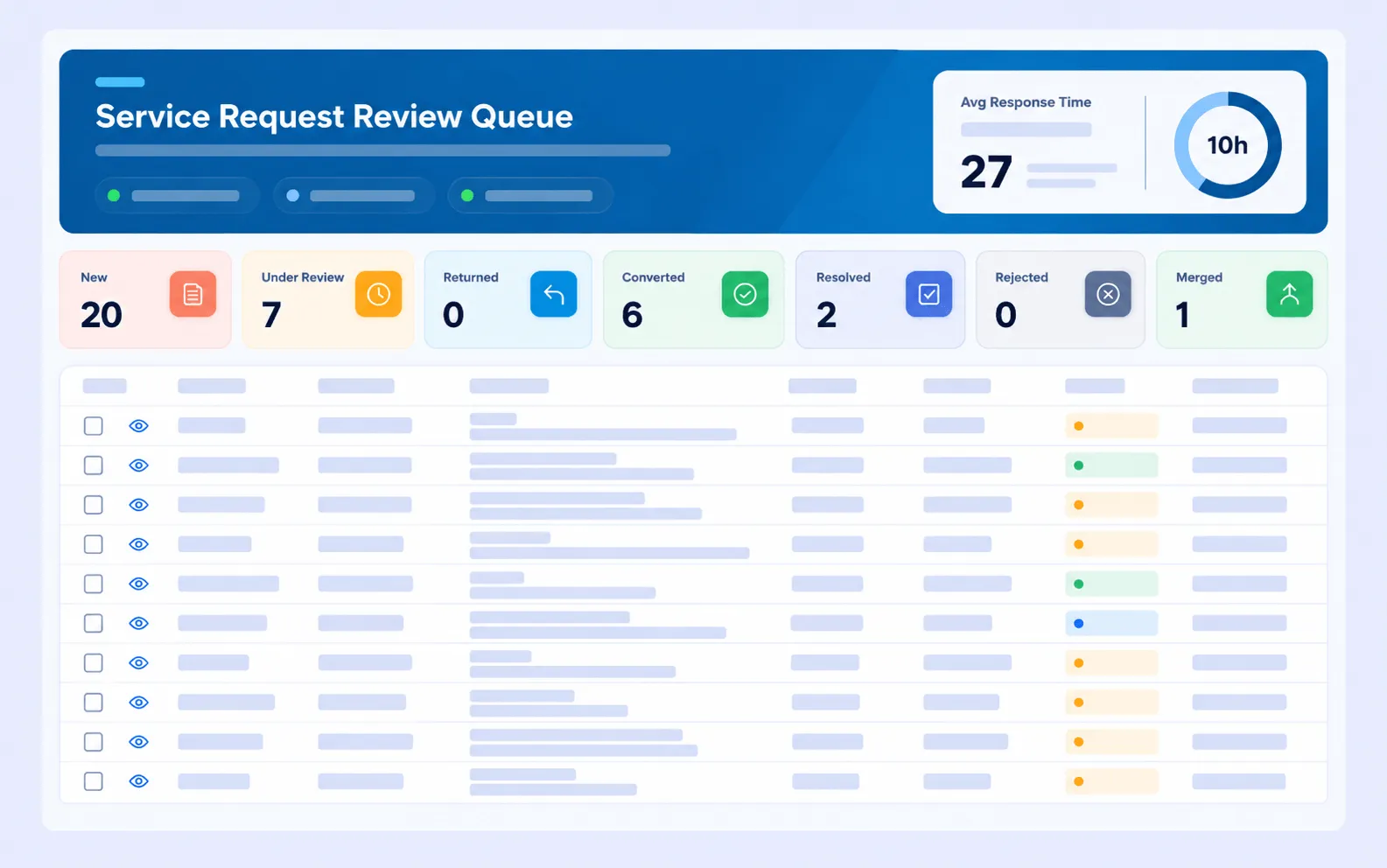
Incoming requests held in a review queue, where duplicates and invalid requests are stopped before they reach the maintenance team.
SLA and escalation
- Respond, attend, contain and fix targets per priority, taken from each contract’s SLA table.
- SLA clocks follow the contract’s working hours.
- Hold time is reported separately as paused time.
- Self-service requests have their own response time target while in review.
Escalation runs at four levels as the SLA time is used up:
| SLA time passed | 25% | 50% | 75% | 100% |
|---|---|---|---|---|
| Alert sent to | Level 1 | Level 2 | Level 3 | Level 4 |
A manager hears about a late job at a quarter of its SLA time, well before it breaches.
Work order lifecycle
| Capability | What it covers |
|---|---|
| Assignment | Suggested or automatic assignment by skill and availability, with reassignment if not accepted |
| Mobile execution | Accept or reject, on my way and arrived with location check, checklists, safety checks, time logs |
| Evidence | Before and after photos, signature, completion notes, job card PDF |
| On hold | Four hold reasons: materials, no access, work permit, under observation. Hold time recorded as paused |
| Extra cost | Quotation and approval steps, including approval by email |
| Spare parts | Stock requests raised directly from the work order |
| Closure | Verified closure, linked requests resolved automatically, reopen and cancel with a full audit trail |
Housekeeping, snagging and corrective actions run on the same work order engine, so the helpdesk follows them the same way.
Dashboards
One dashboard combines all three streams: volumes, SLA performance and satisfaction, broken down by contract and by channel. Each stream also has its own detailed view, covering status counts, conversion and rejection rates, work orders by channel, SLA status by category and monthly KPI performance.
Access and control
- Role-based access, with each agent limited to the contracts they look after.
- Sign-in through Azure for licensed users.
- Requests lock once the helpdesk starts its review.
- Configurable review levels and approval workflows.
- Full audit trail on cancellations and reopened work orders.
- Email safeguards: allowed sender domains per client, spam and loop protection, attachment size limits, and a log of every processed email.
How it connects to other modules
- Task Management runs every work order the helpdesk creates or converts.
- Self Services supplies the portal, QR and public form requests.
- Contract Management supplies the SLA table, working hours and notification recipients per client.
- Customer Satisfaction Survey collects the rating when the job closes.
Frequently asked questions
How many channels can requests arrive through?
Six: phone, email, WhatsApp, portal, QR code and the helpdesk mailbox.
Does every request go straight to a technician?
No. Direct work orders raised by an agent do. Self-service requests pass through a review queue first, where duplicates and invalid requests are stopped.
What does the AI actually do at intake?
It drafts a description from a photo, suggests category, location and priority from email text, and flags likely duplicates. An agent confirms every suggestion before work is scheduled.
When does escalation happen?
At 25, 50, 75 and 100 per cent of the SLA time, to four successive management levels.
Is hold time counted against the SLA?
No. Hold time is recorded and reported separately as paused time.
Can one helpdesk run several clients?
Yes. SLA tables, mailboxes and notification recipients are configured per client and contract, and agents can be limited to the contracts they cover.