

FLEETEK
Fleet Management, Digitised
FLEETEK is HITEK AI's fleet management platform. It digitalises vehicle inventory, scheduling, and asset management on one portal, with live tracking, multi-level booking approvals, and a driver mobile app.
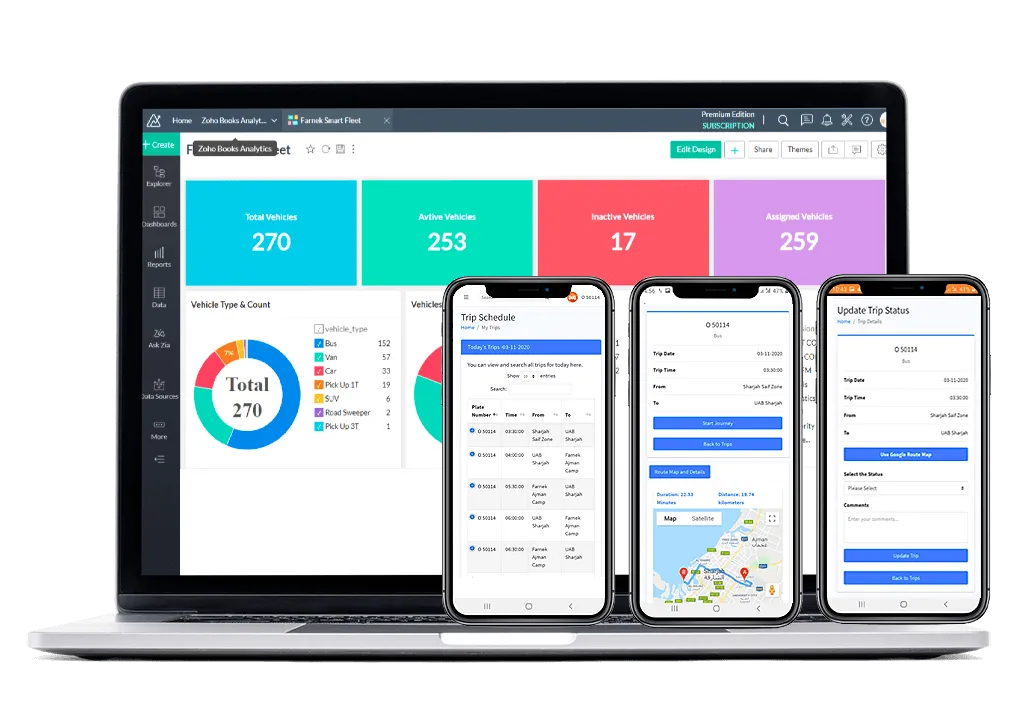
FLEETEK digitalises fleet inventory, scheduling, and asset management, turning vehicle operations into live, trackable data-driven decisions.
One trip, start to finish
The driver mobile app carries every trip through six steps, from login to reporting, with Google Maps routing throughout.
Log in
Driver signs in per vehicle with a QR code.
Receive
The vehicle's daily trips arrive as tasks in the app.
Accept
Driver accepts or rejects each trip, with a reason.
Navigate
Google Maps plots the best route for current traffic.
Complete
Driver runs the trip and updates status on arrival.
Report
Trip time and status feed utilisation and performance.
What makes FLEETEK unique
Complete logistics
A web application covering vehicle and driver inventory, scheduling, and reporting, including monthly financials of the full operation.
Track the location
Location access lets you follow the live position of every vehicle across the fleet.
Driver's app
The smart driver app completes schedules on time with the optimal route, powered by Google Maps.
Periodic readings
The system takes periodic odometer readings, calculates maintenance schedules, and alerts the logistics team.
Driver performance review
Driver performance is evaluated from trip statistics, fines, and accident reports.
Cost savings
Digitising the fleet improves operational efficiency and drives down running cost.
Core functionalities
One portal covers inventory, booking, scheduling, tracking, and reporting, with no separate systems to reconcile.
| Module | What it does |
|---|---|
| Vehicle inventory | Digital register of vehicles and drivers |
| Vehicle booking | Request form with multi-level approval workflow |
| Trip scheduler | Daily trips generated and dispatched as tasks |
| Driver mobile app | QR login, trip accept or reject, Google routing |
| Live tracking | Real-time vehicle location on Google Maps |
| Expense tracker | Fuel, Salik, maintenance, and renewal reminders |
| Maintenance | Odometer readings trigger service alerts |
| Reports and audits | Inventory, utilisation, expense, Zoho custom reports |
Why FLEETEK outperforms spreadsheet fleet ops
What manual fleet management provides
- Vehicle records kept in spreadsheets
- Bookings approved over email threads
- Trips dispatched to drivers by phone
- No live location, status by call
- Expenses reconciled by hand at month end
- Reports compiled manually
What FLEETEK delivers
- One digital register of vehicles and drivers
- Multi-level approvals on the portal
- Trips auto-dispatched to the driver app
- Live location and status on Google Maps
- Fuel, Salik, and maintenance tracked continuously
- Utilisation and expense reports on demand
See FLEETEK run your fleet on one portal
Book a demo and watch bookings, trips, and live tracking move in real time.
Schedule a Free DemoBookings that route themselves
Division admins book available vehicles or raise new vehicle requests from the portal, and every request follows a two-tier approval chain.
- Division admins book available vehicles from the booking module
- New vehicle requests are raised on the portal request form
- Division level: requestor is the Division Admin, approver is the Division Manager or Director
- Logistics level: approver is the Logistics Admin or Manager
- Every booking and request triggers email notifications and is available for approval on the portal
Five ways it earns its place
Vehicle expense tracker
- Records vehicle expenses including fuel, Salik, and maintenance
- Monthly vehicle expense reports
- Reminders for renewals and payments: branding, registration, insurance
Vehicle booking
- Book available vehicles from the booking module
- Raise new vehicle requests on the portal
- Two-tier approval, division then logistics
- Email notifications, with approvals on the portal
Drivers mobile app
- Login per vehicle using a QR code
- Daily trips arrive for the assigned vehicle
- Accept or reject trips with reasons, with full trip detail
- Origin, destination, distance, and Google Maps routing for current traffic
- Update trip status on arrival
Reports and audits
- Vehicle inventory and assignment reports
- Vehicle utilisation report
- Trips status and trip location reports
- Monthly vehicle expense report
- Integrated with Zoho for detailed, custom reports
Trip scheduler and monitoring
- Admins schedule daily vehicle trips from the scheduler
- Trips generate automatically as tasks to the driver app
- Utilisation reporting based on trip schedules
- Real-time trip status and location from the mobile app
- Required trip time calculated with Google Maps
- Driver performance from expected against actual trip time
Common questions
What can drivers do in the mobile app?
Drivers log in per vehicle with a QR code, receive daily trips, accept or reject them with reasons, follow the best Google Maps route for current traffic, and update trip status on arrival.
How do vehicle bookings get approved?
Bookings follow a two-tier chain. At division level the requestor is the Division Admin and the approver is the Division Manager or Director. At logistics level the approver is the Logistics Admin or Manager. Every step sends an email and is actioned on the portal.
Can I track vehicles live?
Yes. FLEETEK shows the live location of every vehicle on Google Maps, alongside real-time trip status pushed from the driver mobile app.
What reports does FLEETEK provide?
Vehicle inventory, assignment, and utilisation reports, trip status and location reports, and monthly vehicle expense reports. A Zoho integration generates more detailed, custom reports.
Does FLEETEK connect to other HITEK AI products?
Yes. Fleet data links to CAFMTEK, IOTEK, SAFETEK, and the wider HITEK AI ecosystem, connecting fleet operations to assets, monitoring, and safety.
Need a consultation?
Drop us a line. Tell us about your fleet and we will show you FLEETEK running it on one portal.