






CAFMTEK

AI Powered CAFM Software for Facility Management Teams

CAFMTEK is computer-aided facility management software from HITEK AI, part of the Farnek Group in the UAE. Sixteen modules cover the asset register, helpdesk, work orders, planned maintenance, SLAs, stores and energy in one system.

  • 16 modules in one platform
  • Cloud or on-premise
  • iOS and Android
  • AI included as standard
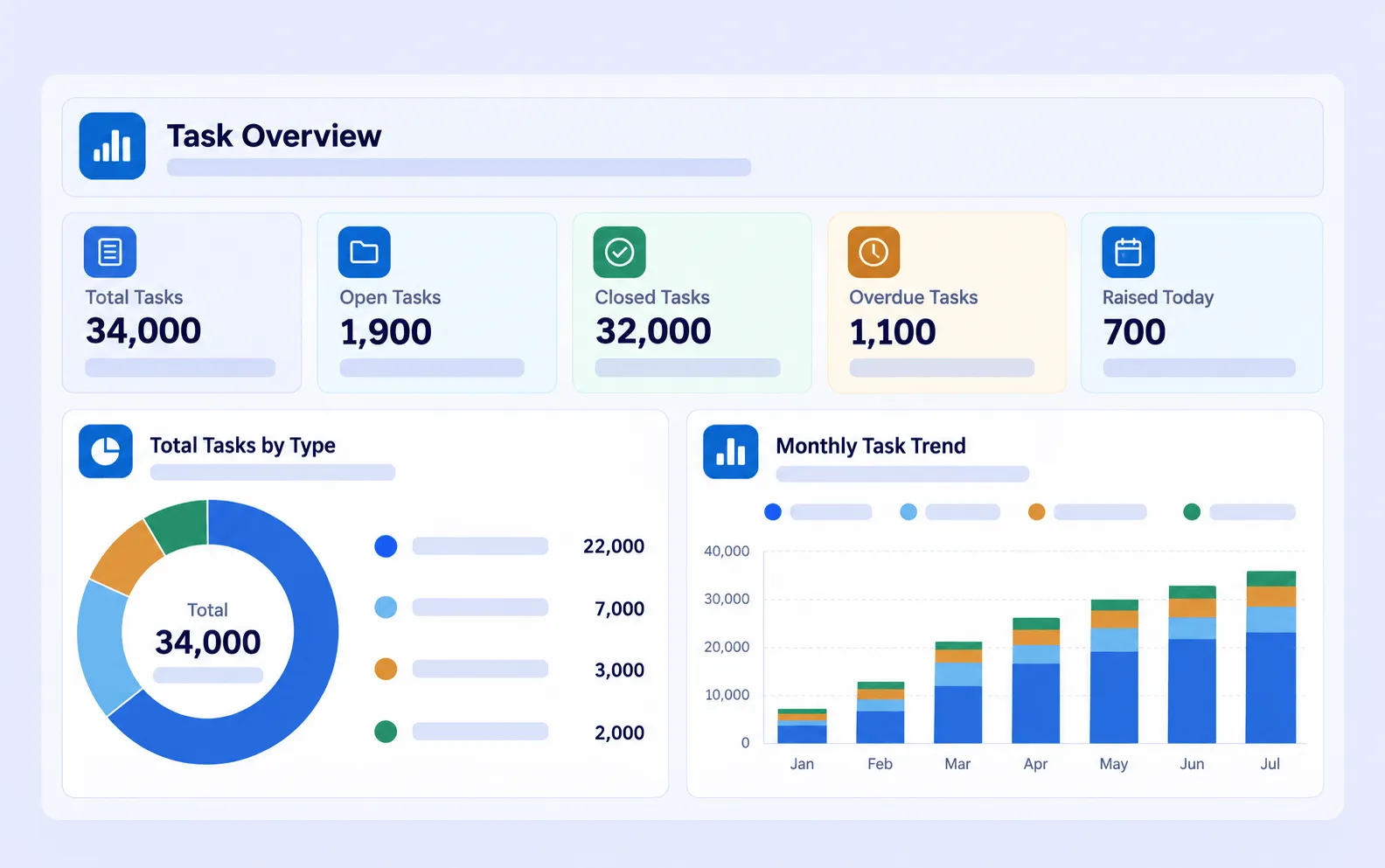
CAFMTEK task overview dashboard showing total, open, closed and overdue tasks, tasks by type and the monthly task trend

CAFMTEK holds your asset register, takes maintenance requests from any channel, turns them into work orders, runs your planned maintenance schedule, and tracks every job against the service levels in your contract.

Trusted by leading organisations

Sports Boulevard KSA Yas Marina Circuit Maaden KSA Mashreq UAE Kempinski Hotels UAE United Arab Bank Du Network UAE Burj Khalifa Jeddah Airport Expo City Dubai Safari Telcom Dubai Police Circle Mall UAE 7132 Hotels Switzerland Etisalat UAE

Service levels

Four stages, not two

Most systems measure when a job was acknowledged and when it was closed. CAFMTEK measures four points on every request, so a client can see exactly where the time went.

01

Respond

Time to acknowledge the request.

02

Attend

Time for a technician to reach the site.

03

Contain

Time to make the issue safe or stop it worsening.

04

Fix

Time to fully resolve the issue.

Capabilities

What you get on day one

01

Every request, one work order engine

Requests reach a facility team in six different ways. CAFMTEK brings all of them into one review queue, so nothing is logged twice and nothing is lost in an inbox.

  • Six intake channels. Phone, email, WhatsApp, portal, QR code and the helpdesk mailbox
  • A review gate. Duplicates and invalid requests are stopped before they reach the maintenance team
  • Channel recorded on every job. So demand can be reported by channel as well as by contract
  • Four escalation levels. With SLA clocks running on working hours
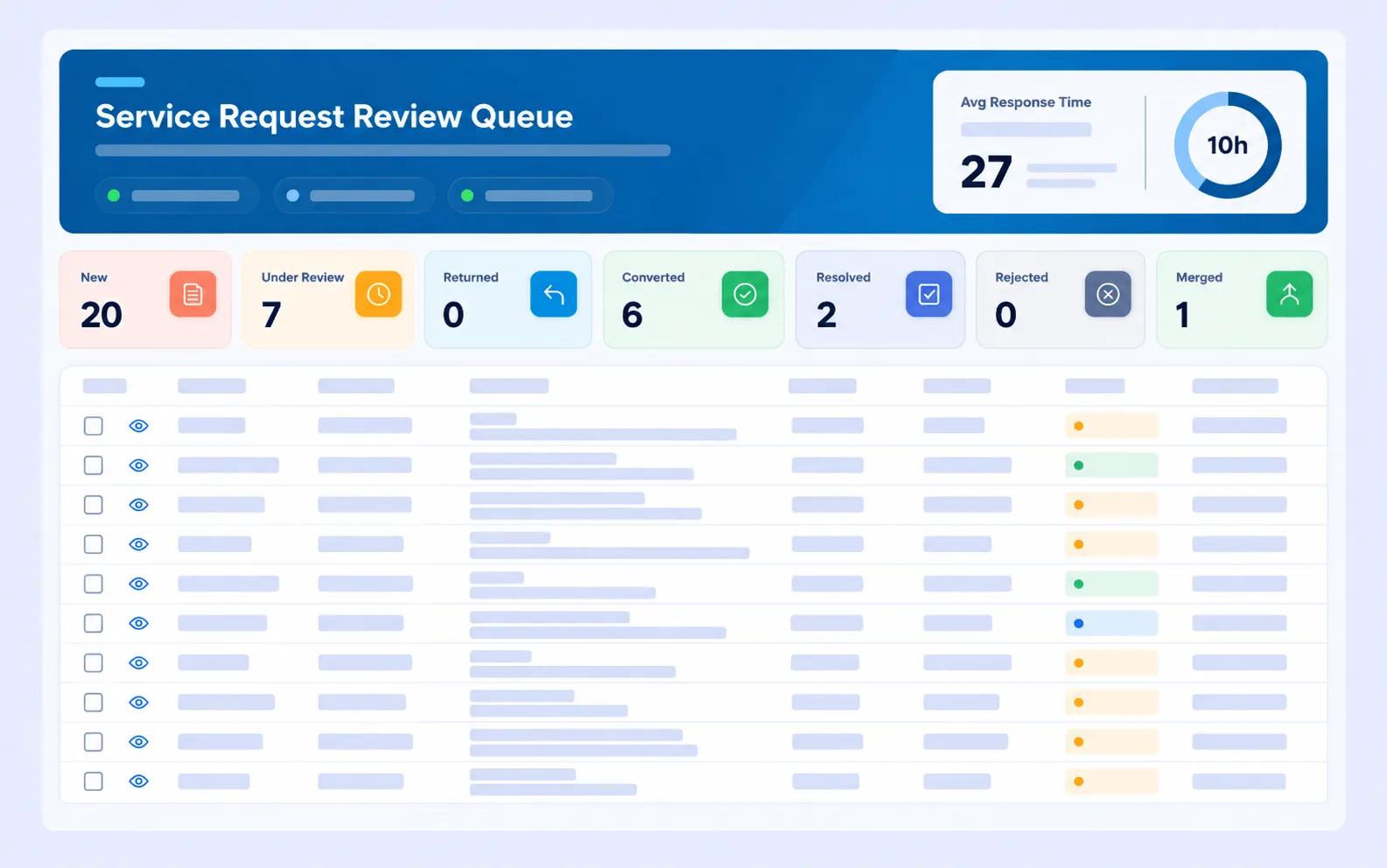
CAFMTEK service request review queue with counts for new, under review, returned, converted to work order, resolved, rejected and merged requests
02

One asset register everything points at

Every work order, inspection and PPM plan references the same asset record, so the maintenance history stays in one place rather than spread across spreadsheets.

  • Full classification. Category, sub category, type and class, with a criticality rating on a defined matrix
  • Two hierarchies. Parent and child components, plus the facility location hierarchy
  • QR and barcode labels. Generated per asset for scanning on site
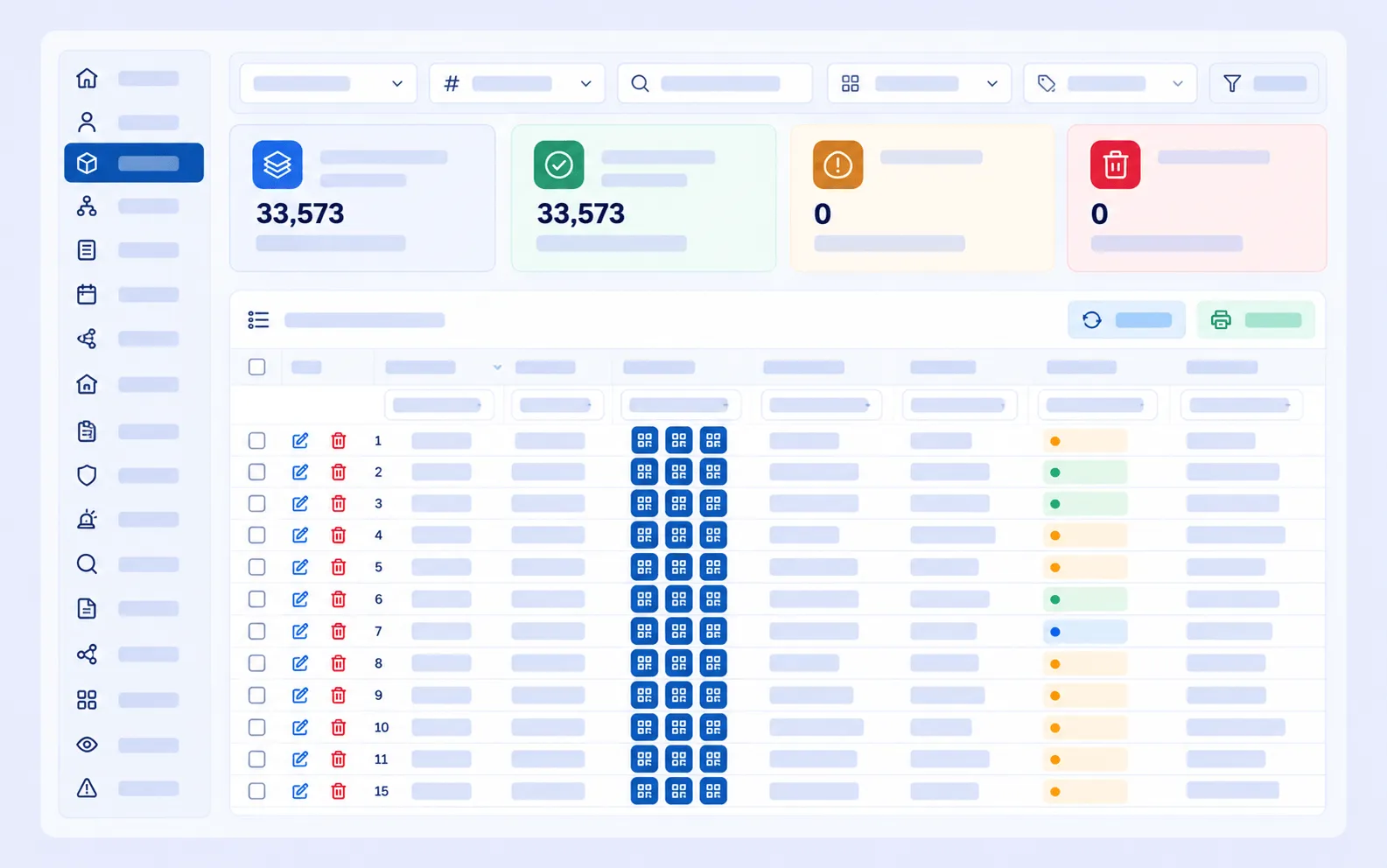
  • Bulk import and audits. Excel import, movements between locations, and physical checks that reconcile records against what is actually there
CAFMTEK asset register listing assets with QR and barcode labels, edit controls and total asset counts
03

Planned maintenance that schedules itself

Define the schedule once, by asset, location or asset group, and the system creates the work orders. No more rebuilding the plan in a spreadsheet every quarter.

  • Any frequency. Daily, weekly, monthly, quarterly or yearly
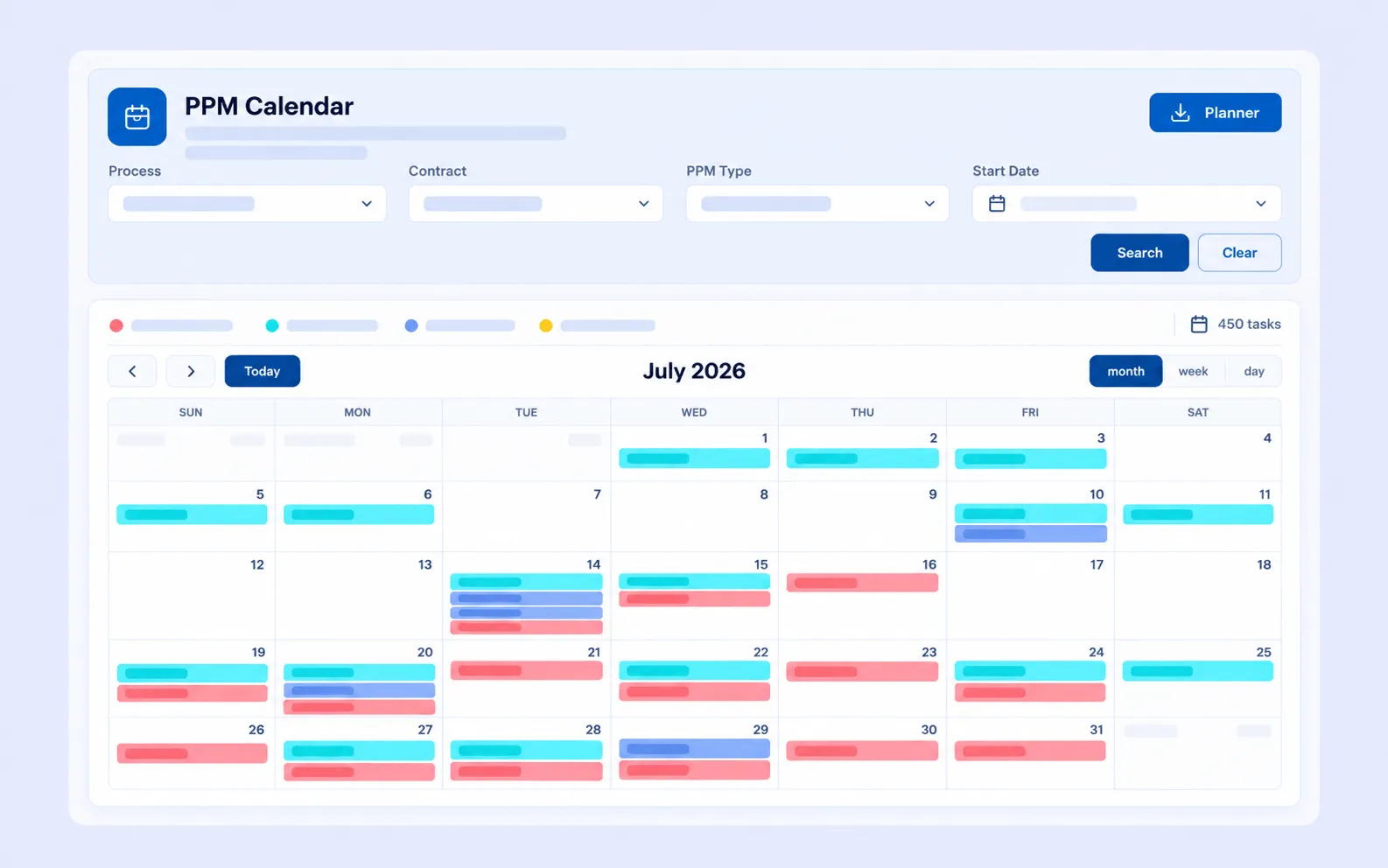
  • Visual calendar planner. See the whole month across every contract
  • Overnight generation. The next day's tasks are created and assigned automatically
  • Bulk upload. Load an annual maintenance plan in one go
CAFMTEK PPM calendar showing scheduled weekly, monthly, three monthly and six monthly maintenance tasks across a month
04

Monthly KPI scorecards per service

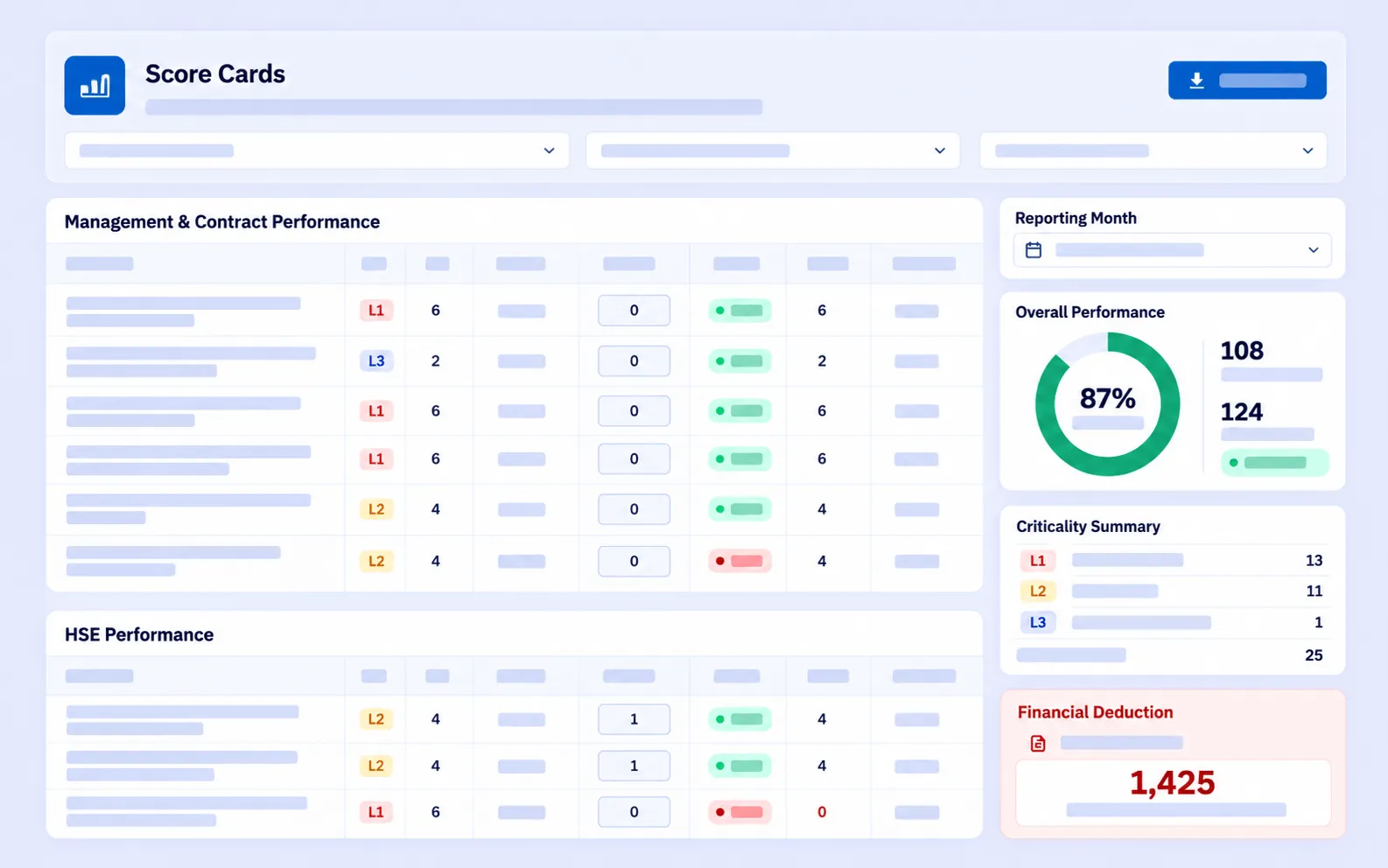
Each outsourced service is scored every month against an agreed KPI catalogue, with criticality tiers set per contract. The result is a performance figure both sides can check, rather than a judgement call in a meeting.

  • Per service stream. Cleaning, landscaping, HSE, security and the rest scored separately
  • Criticality weighted. Each KPI's tier sets its weight and the tolerated non-compliance
  • Pass or fail per KPI. No partial credit, so the figure is defensible
  • Month close. Closing a month freezes a snapshot that cannot change silently
CAFMTEK monthly score card with service streams scored by criticality tier, overall performance and a criticality summary
05

Anyone on site can report a problem

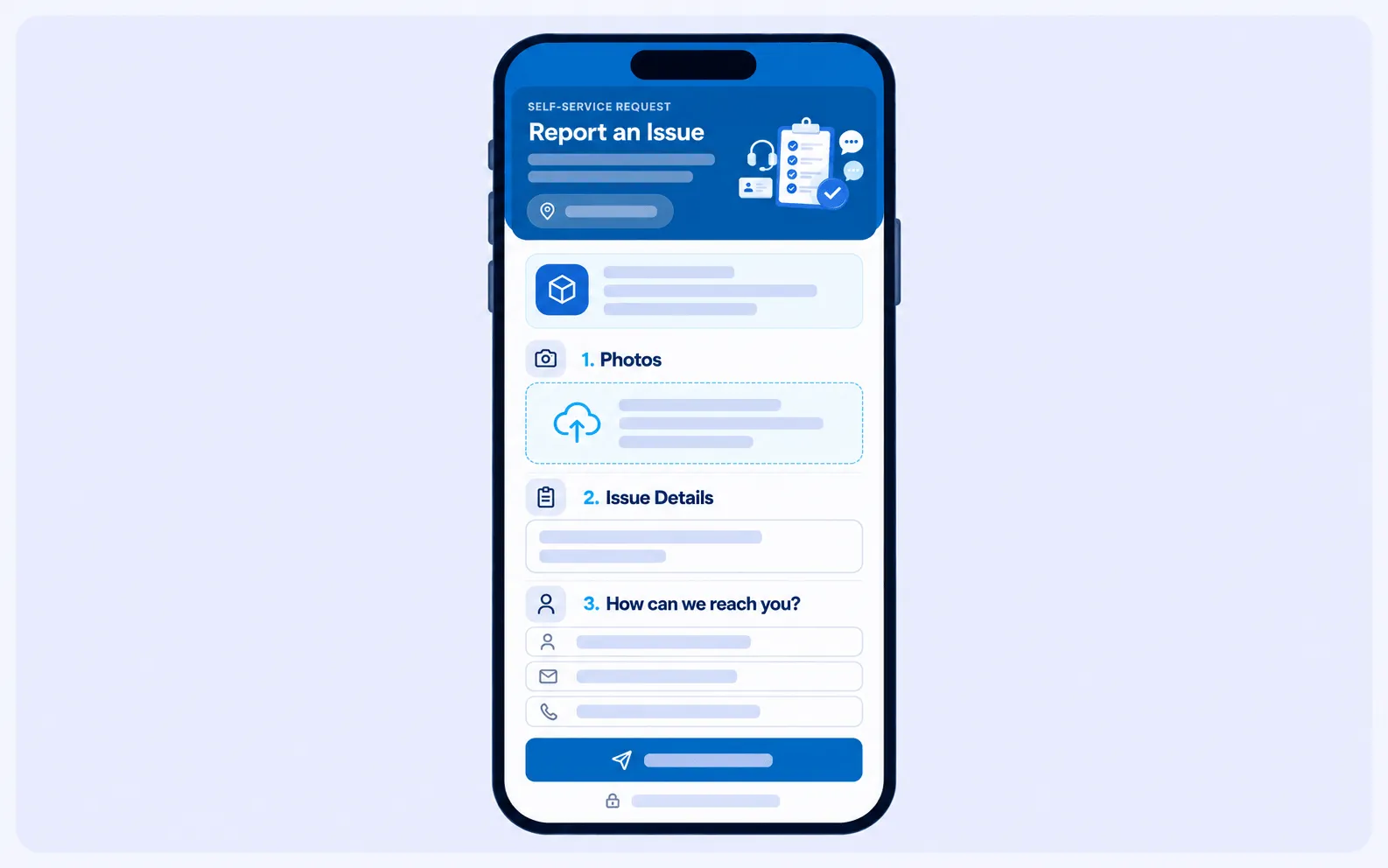
Occupants, tenants and visitors will not install an app or remember a portal password. They scan a QR sticker, add a photo, and the request lands in the same queue as everything else.

  • No login needed. The asset and location come from the sticker
  • Photo first. AI drafts the description from the image and suggests category and priority
  • Tracked to closure. A reference number, progress updates and a rating at the end
  • Technician apps. iOS and Android for the people doing the work
CAFMTEK report an issue form on a mobile phone, with photo upload, issue details and contact fields

Artificial intelligence

AI is included as standard

Not a separate tier and not an add-on. These run against the maintenance data you are already collecting.

Fault detection and diagnostics

Flags equipment faults and the likely cause, so a technician arrives knowing what to look at rather than starting from scratch.

Predictive maintenance

Anomaly detection spots unusual asset behaviour between service visits, which is where most failures start.

Suggested PPM intervals

Recommends maintenance frequencies from the asset's real history instead of leaving you on manufacturer defaults forever.

AI assisted intake

Drafts a request description from a photo and suggests the category, location and priority, so reports arrive usable.

Core functionalities

How CAFMTEK runs a working day

ModuleWhat it does
HelpdeskSix intake channels, three service streams, four escalation levels
Task managementEvery work order with approval paths, SLA monitoring and audit trails
Asset managementThe maintained register, with criticality, history and verification audits
PPM managementRecurring schedules converted into assigned work orders automatically
SLA and KPIContract specific service levels and monthly scoring per service stream
Resource plannerRoster, utilisation and planned against actual hours
Store managementStock levels, material requests, approvals, returns and transfers
Energy managementUtility capture, tariff costing and CO2 accounting per contract

Before and after

What changes when the work is in one system

Spreadsheets, Email and Phone calls

  • Requests arrive in five places and get logged in none of them
  • The asset list is a spreadsheet somebody last opened in March
  • PPM is planned once a year and slips quietly after week six
  • SLA performance is argued about rather than measured
  • Reporting means a week of chasing before the client meeting
  • Nobody can say what a given asset has cost to maintain

CAFMTEK

  • Every channel ends in the same work order register
  • One asset register with criticality, history and documents attached
  • PPM generates its own work orders on schedule
  • Four stage SLA timing recorded on every request
  • Scheduled reports email themselves to the distribution list
  • Full maintenance and cost history per asset

See it running on your own estate

A demo walks through the modules you would actually use, with your asset types and your contract structure rather than a generic sample.

Book a demo

Why CAFMTEK

What is different here

Built by an FM operator

HITEK AI is part of the Farnek Group, so the product comes from a company that runs facilities, not only from software engineers. The workflows match how the work is actually done.

Deployment on your terms

Run it in the cloud or install it on your own servers. That matters where data residency rules apply, which is common in government, defence and healthcare work.

Multi contract by design

Each contract carries its own SLAs, processes, location hierarchy and rules. Users see only the contracts their permissions allow, so one system serves a whole portfolio.

Evidence, not opinion

Four stage SLA timing, monthly KPI scorecards per service stream, and an audit trail on every record. Contract reviews run on figures both sides can check.

The full set

Sixteen Modules

Every CAFMTEK client gets the same core. Snagging is included as standard, and robotics can be added where a site needs it.

Dashboard
Reports
Contract management
Subcontractor management
SLA and KPI management
Resource planner
Facilities management
Asset management
Snagging
PPM management
Task management
Customer Satisfaction survey
Self services
Helpdesk
Store management
Energy management

Each module has its own documentation page covering what it does and how it connects to the rest of the system. Read the documentation for all sixteen modules.

In their words

What our customers say

CAFMTEK is by far one of the best FM platforms that we have used. It allows us not only to raise our requests on the go, but it also gives us complete real time visibility of the facility service being delivered.
Rizwan Tariq Rizwan Tariq Director Pavilion - Islamic Republic of Pakistan Pavilion Expo 2020
The HITEK CAFMTEK system has helped us keep a track of day today cleaning activities being carried out across various locations. It acts as a catalyst to ensure that cleaning activities are completed within the stipulated schedule
Roxy Terrance Roxy Terrance Manager Premises Management - RAK BANK
We have 447 students accommodated in over 330 rooms who now have the flexibility to organize their own cleaning at a time that suits them. Being digital natives, students prefer using technology to organize this service...
Dr. Hamad Odhabi Dr. Hamad Odhabi Vice Chancellor - Abu Dhabi University

Questions

Before you book a demo

What does CAFMTEK do?
It holds your asset register, takes maintenance requests from any channel, turns them into work orders, runs planned maintenance schedules, and tracks performance against your contract SLAs.
Is CAFMTEK cloud based or on-premise?
Both. You can run it in the cloud or install it on your own servers.
What AI features does CAFMTEK include?
Fault detection and diagnostics, predictive maintenance with anomaly detection, suggested PPM intervals from real asset data, and AI assisted intake that drafts a request from a photo. All included as standard.
Does CAFMTEK have a mobile app?
Yes, for iOS and Android. Technicians receive jobs, scan QR codes and record work on site.
Can people report issues without a login?
Yes. Anyone can scan a QR sticker on an asset or location, or open a public form link. The asset and location are filled in from the sticker, so the helpdesk gets accurate detail.
Can CAFMTEK manage more than one contract or site?
Yes. Contracts, locations and SLAs are managed separately, and users only see what their permissions allow. One system can run a whole portfolio.
How does CAFMTEK track SLAs?
Each contract carries its own SLA rules by priority, with operating days and hours. Every request is then measured across four stages: respond, attend, contain and fix.
How much does CAFMTEK cost?
Pricing depends on the modules you enable and the number of sites and users. Contact us for a quote.

Book a demo

Tell us about your estate

Send a few details and we will set up a walkthrough against your own asset types and contract structure. No obligation, and we will tell you plainly if CAFMTEK is not the right fit.